
Drive and Shop with Shipt
ShiptBusiness
4.211.65K Reviews
- Version
- 4.130.0
- Installs
- 1.00M
- Age Rating
- Everyone
Screenshots

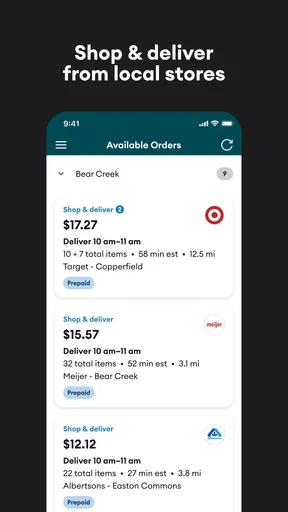
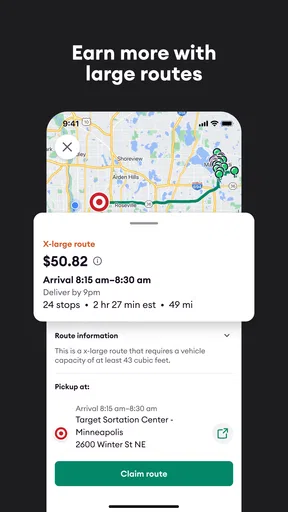
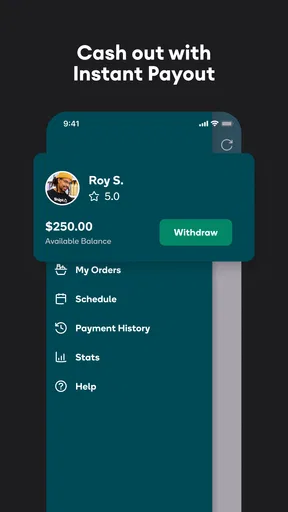
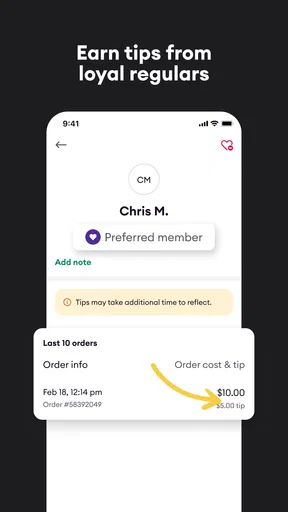
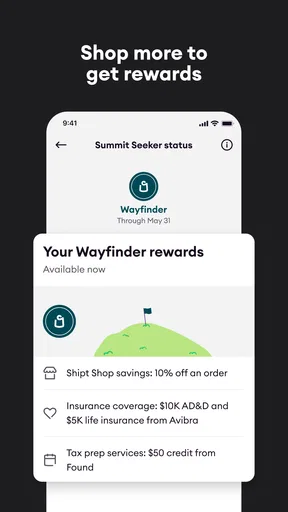
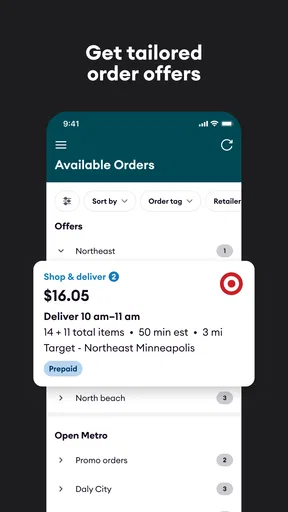
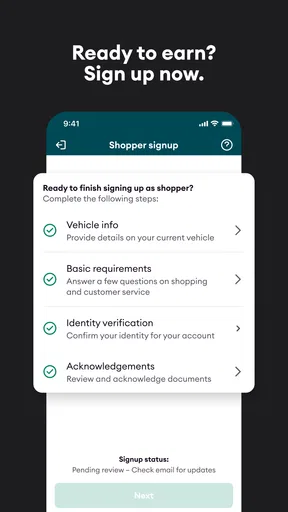
Our Review of Drive and Shop with Shipt
 Analysis by Appyee
I approached Drive and Shop with Shipt as a practical work app rather than a typical shopping tool. Its purpose is straightforward: it connects people interested in delivery driving or personal shopping with flexible shift-based work. That makes it most relevant to someone who wants to fit deliveries around another job, study, family responsibilities, or changing weekly availability.
My first impression is that the app is easier to understand when you think of it as a work-planning companion, not a guaranteed income machine. The useful question is not simply whether it is free, but whether the available work in your area, your transport setup, and your tolerance for shopping and delivery tasks make the opportunity worthwhile. I like that the idea is direct, although the real value depends heavily on what assignments and shifts you can actually access.
How the app feels in everyday use
The app comes from Shipt and sits in the business category. It is free to install, has an Everyone age rating, and supports devices running Android 7.0 or later. Its current version is 4.128.0, which shows that this is an actively maintained product rather than an abandoned utility. On the Android store, it has passed 1 million installs, with an average rating of 4.2 from around 41 thousand ratings and roughly 12 thousand written reviews.
Those figures suggest that it has reached a substantial working audience, but they should not be mistaken for a promise that the experience will be equally good everywhere. A delivery marketplace is unusually local. The app can be well designed while the number, timing, and practicality of available shifts vary from one area to another. I would treat the download as a way to investigate a work option, not as evidence that a full schedule will automatically appear.
The basic appeal is flexibility. Instead of committing to a conventional fixed timetable, I can use the app to look for work that fits around the rest of my day. That is valuable for someone who needs control over when they work. It also changes the kind of discipline required: flexibility only helps if I check opportunities regularly, leave enough time for each task, and avoid accepting work that clashes with other commitments.
Planning a realistic shift
A common mistake would be to judge an opportunity only by the headline amount or by how convenient the start time looks. Shopping and delivery work includes preparation, travel to the store, time spent locating products, checkout, loading, driving, and completing the handoff. I would also allow room for parking, traffic, substitutions, and the occasional customer message. The app is most useful when I use it to organize a realistic block of time rather than squeezing a delivery into a gap that is too small.
For example, imagine I have a free afternoon before collecting a child from school. I might use the app to find a shift that appears to fit, then compare its timing with the distance to the store, the route toward home, and the possibility that shopping takes longer than expected. If the schedule leaves no margin, the flexibility becomes stressful. If I choose a manageable block and prepare my route before starting, the same work can feel much more controlled.
This is one of the less obvious trade-offs: the app may help me choose when to work, but it does not remove the planning burden. In fact, the more seriously I take the work, the more I need to plan around travel and task complexity. Someone who enjoys organizing routes and managing time will probably get more from it than someone looking for completely spontaneous, effortless earnings.
Shopping and driving are different kinds of work
The name combines driving and shopping, but those activities do not demand the same skills. Driving-focused work may suit someone who prefers moving between locations and keeping customer interaction brief. Personal shopping requires patience inside a store, attention to product details, and the ability to make sensible decisions when an item is unavailable or a customer’s request needs clarification.
I would not choose this app solely because I enjoy driving. If I dislike navigating aisles, checking product sizes, or dealing with substitutions, the shopping side could be more tiring than expected. On the other hand, a person who likes practical errands may find that the shopping element breaks up the monotony of driving. The best fit depends on which part of the workflow feels natural to you.
A useful personal test is to imagine the least convenient order, not the ideal one. Can I stay calm if the store is crowded? Am I comfortable carrying bags and protecting groceries during the trip? Can I communicate clearly if something is missing? These questions matter more than the attractive simplicity of the store summary because they reveal whether the day-to-day tasks match my temperament.
What has changed in the current version
The current version, 4.128.0, is the clearest verified sign of ongoing product evolution. A version number by itself does not tell me that a particular screen, payment rule, map behavior, or assignment system has changed, so I would avoid assuming that every update transforms the experience. What it does tell me is that the app is being carried forward and remains relevant to its intended work process.
For existing users, that matters in a practical way. Keeping the app updated can reduce the chance of running an outdated build while checking shifts or managing an active task. It is also sensible to read the update notes shown on the device before installing, especially if the app is part of a regular work routine. I would not schedule an important delivery around an update; I would update beforehand and open the app afterward to make sure the workflow still feels familiar.
The product’s long presence also gives it a different character from a newly launched side-work app. It was released on April 14, 2015, so the service has had years to refine its approach to delivery-oriented work. That history is encouraging, but it should not be confused with a guarantee of local demand or an identical experience for every worker. Longevity supports confidence in the product’s continuity; it does not answer the economic questions that depend on an individual market.
How I would use it before accepting work
I would begin by checking the app at the times I could genuinely work, rather than accepting a shift first and rearranging the rest of my life afterward. I would compare the expected route with my vehicle’s fuel needs, parking conditions, and the time required to return home. If I were shopping, I would be especially careful about whether the task could involve several aisles, bulky bags, or a store layout I do not know well.
My second tip is to keep a simple private record of the time spent on each type of task. The app can help organize the work, but my own notes help reveal whether a particular shift is worthwhile after driving and preparation are included. This is a more useful measure than judging one unusually smooth delivery. It also helps me learn which locations, times, and order types fit my routine.
My third tip is to protect a buffer between the end of a shift and any fixed appointment. A delivery job can be affected by store queues, traffic, or a customer needing extra coordination. Flexibility works best when I preserve some breathing room. If I need to be somewhere at an exact time, I would choose a shorter or earlier work period rather than relying on perfect conditions.
Where it fits among alternatives
Compared with a conventional part-time job, the main advantage is control over availability. A standard employer may offer more predictable scheduling, workplace routines, and clearer separation between work and personal time. Drive and Shop with Shipt is more appealing when my schedule changes often or when I want to test delivery work without immediately taking a fixed retail position.
Compared with other delivery or courier apps, the distinction is the combination of driving and personal shopping. A courier service may be better for someone who wants to pick up prepared packages or meals and avoid selecting groceries. A shopping-focused alternative may be preferable if I want to spend more time in stores and less time on the road. Shipt’s mixed identity is a strength for people who want variety, but it is a weakness for anyone seeking only one narrowly defined type of task.
Compared with simply searching for a local retail job, this app offers a more mobile form of work. The trade-off is that I take on more responsibility for planning travel and managing the practical costs of being on the road. I would choose it for flexibility and independence, not because it automatically provides the stability of a traditional hourly role.
What may frustrate new and returning users
The first friction point is uncertainty. Seeing a work opportunity is not the same as knowing how profitable the entire task will be after time and travel. New users may focus on the delivery itself and underestimate the unpaid minutes around it. I would enter with realistic expectations and judge the workflow over several ordinary shifts, not one unusually easy experience.
The second is the mental load of switching between app instructions, store decisions, navigation, and customer communication. Even when each step is simple, the combination can become tiring. I would avoid using the app while driving and prepare as much as possible before moving. A phone mount, a charged device, and a clear route plan are practical necessities for safe, calm work, even though they are not substitutes for good task selection.
The third limitation is that flexibility can encourage overbooking. If I accept work during every available gap, I may end up with no time for fuel, meals, vehicle maintenance, or recovery. The app is not a replacement for a personal schedule. I see it as a tool that works best when I set boundaries before opening it.
It may also be the wrong choice for someone without reliable transportation, someone who wants guaranteed fixed hours, or someone who strongly dislikes customer-facing errands. Likewise, if my main goal is to shop without driving, or to drive without shopping, a more specialized service could be a better match. This app’s broad workflow is useful precisely because it combines roles, but that combination will not suit everyone.
Questions I would settle before relying on it
I would first ask whether the app is suitable for my device. The Android requirement of 7.0 or later covers many older phones, but an operating-system number is only the starting point. I would also make sure the phone performs reliably with navigation and multitasking, because a device that struggles during a store visit can create more trouble than the app itself.
I would next consider whether “flexible” fits my personal definition of work. If I need a guaranteed weekly timetable, I would compare this option with a conventional job before investing much time. If I simply need the ability to work around changing commitments, the model is more promising, provided I am comfortable with variable opportunities and the practical demands of delivery.
Another question is whether I want shopping responsibility. If I prefer straightforward driving, I would look closely at how much of the available work involves entering stores and selecting items. If I enjoy errands and careful organization, that same feature may be the reason to choose this app over a driving-only alternative.
Finally, I would ask whether I can evaluate the work honestly. That means tracking my total time, travel, fuel, and energy rather than looking only at the most visible part of a task. This habit turns the app from a vague side-income experiment into something I can assess against my actual routine.
What I would watch as the app continues
For future updates, I would pay attention to changes that make active work easier to manage: clearer task information, smoother navigation between shopping and delivery steps, and reliable handling of schedule details. I would also look for improvements that reduce unnecessary tapping while I am preparing or finishing a task. These are the areas where a mature work app can make a noticeable difference without changing its basic purpose.
I would also watch how well the experience keeps serving both sides of its identity. A driver may want quick, clear movement from one stop to the next, while a personal shopper needs enough detail to make accurate choices in a store. If one workflow becomes easier at the expense of the other, the app could feel less balanced. Its strongest future would preserve the flexibility while reducing the mental effort around each assignment.
My overall view is positive but measured. I see a free business app with a clear use case, a substantial user base, and a current version that indicates continued maintenance. I would recommend it to a self-directed person who wants flexible delivery or personal-shopping work and is willing to plan carefully. I would not recommend treating it as effortless income or as a universal substitute for a stable job.
The best reason to try it is control over when you work; the biggest reason to think twice is the responsibility that comes with that control. If your vehicle, schedule, and personality suit shopping and delivery tasks, Drive and Shop with Shipt can be a practical addition to your working options. If you need predictable hours, dislike store-based errands, or cannot absorb the travel and planning involved, another kind of work app—or a traditional job—will probably serve you better.
Privacy and Permissions
See what permissions an app requests and how it handles your data.
- Location
- approximate location (network-based), precise location (GPS and network-based)
- Photos/Media/Files
- read the contents of your USB storage, modify or delete the contents of your USB storage
- Storage
- read the contents of your USB storage, modify or delete the contents of your USB storage
- Camera
- take pictures and videos
- Microphone
- record audio
- Wi-Fi connection information
- view Wi-Fi connections
- Other
- view network connections, connect and disconnect from Wi-Fi, full network access, change your audio settings, run at startup, draw over other apps, control vibration, prevent device from sleeping, read Google service configuration
Verdict
Strengths of Drive and Shop with Shipt
- Same-day delivery is convenient for groceries and household essentials.
- Personal shoppers can communicate about substitutions and product availability.
- The app supports scheduled delivery windows for better planning.
- Easy reordering helps save time on frequently purchased items.
- Useful order tracking keeps you updated from shopping to drop-off.
Limitations of Drive and Shop with Shipt
- Delivery fees and membership costs can increase the total order price.
- Item prices may differ from those in the physical store.
- Substitutions may not always match your preferred brand or size.
- Delivery availability and time slots vary by location.
- Fresh produce quality can be inconsistent since someone else selects it.
Other Releases by Shipt
View All
Shipt: Order Grocery Delivery
Food & Drink4.5
Similar Picks in This Category
View All
LinkedIn: Community & Network
LinkedIn3.8

Zoom Workplace
zoom.com4.1

Microsoft Teams
Microsoft Corporation4.6

Meta Business Suite
Meta Platforms, Inc.4.6

Webex Meetings
Cisco Systems, Inc.4.5

TeamViewer Remote Control
TeamViewer4.4
Frequently Asked Questions
What is Drive and Shop with Shipt?
Drive and Shop with Shipt is a shopping and delivery platform that lets users order groceries, household essentials, and other everyday products from participating retailers. Depending on availability in your area, you can choose delivery or pickup options, browse products in the app, add items to your cart, and follow the order status until it is ready or delivered.
How does ordering through Drive and Shop with Shipt work?
After creating an account, enter your delivery address or select an available pickup location. Browse the participating store, search for the products you need, and add them to your cart. Before placing the order, review substitutions, fees, delivery instructions, and the estimated arrival time. A shopper or store team then prepares the order according to the selected service.
Is a Shipt membership required to use the app?
A Shipt membership is not always required, but the available benefits and costs may differ depending on how you use the service. Non-members may be able to place individual orders while paying applicable delivery or service fees. Members can receive benefits such as reduced delivery costs or special offers, although eligibility, minimum order requirements, and pricing should be checked in the app.
Can I request substitutions or communicate with the shopper?
Yes, the app generally allows you to manage substitutions while building your order. For many products, you can accept a suggested replacement, choose a specific alternative, or request no substitution. During shopping, communication features may also let you respond to questions or approve changes. Product availability and communication options can vary by retailer, location, and order type.
What should I know about prices, fees, and delivery availability?
Prices, delivery charges, service fees, taxes, membership benefits, and minimum order requirements can vary by retailer and location. Some items may also have different prices in the app than in a physical store. Before confirming payment, carefully review the complete order summary and estimated total. Delivery windows and pickup availability depend on local store capacity and demand.
